Interior design project management software
Your Creative Vision.Your Entire Design Business.One Place.
From discovering the perfect piece to delivering the finished room, Qurate helps interior designers source products, impress clients, manage approvals, protect profits, and stay organized through installation.
Spend less time managing the details. More time doing what you love — designing.
Plans from $19/month. A card is required to start the trial and is not charged until it ends. Cancel anytime.
Beautiful Designs Shouldn't Come With
Administrative Chaos.
You didn't become an interior designer to spend your days chasing approvals, updating spreadsheets, searching for missing shipments, or rebuilding invoices.
But as your projects grow, so does the work behind the scenes.
Qurate brings the moving parts of your design business together, so you can stay focused on your clients, your creativity, and your next great project.
Less Busywork
Keep products, project information, and client decisions organized.
Happier Clients
Make presentations, feedback, and approvals easier.
Protect Your Profit
Keep vendor costs, sourcing details, and markups under your control.
Fewer Surprises
Stay informed as products move through receiving and delivery.
One Seamless Workflow.
From Inspiration to Installation.
Discover & Organize
Capture products from your favorite retailers and build organized collections.
See how: Discover & OrganizePresent & Approve
Create compelling presentations, visualize ideas, and collect client feedback.
See how: Present & ApproveInvoice & Get Paid
Turn approved selections into invoices and simplify payment collection.
See how: Invoice & Get PaidTrack & Deliver
Follow products through receiving, storage, and installation.
See how: Track & Deliver
Product sourcing
Find It. Save It.
Never Lose It.
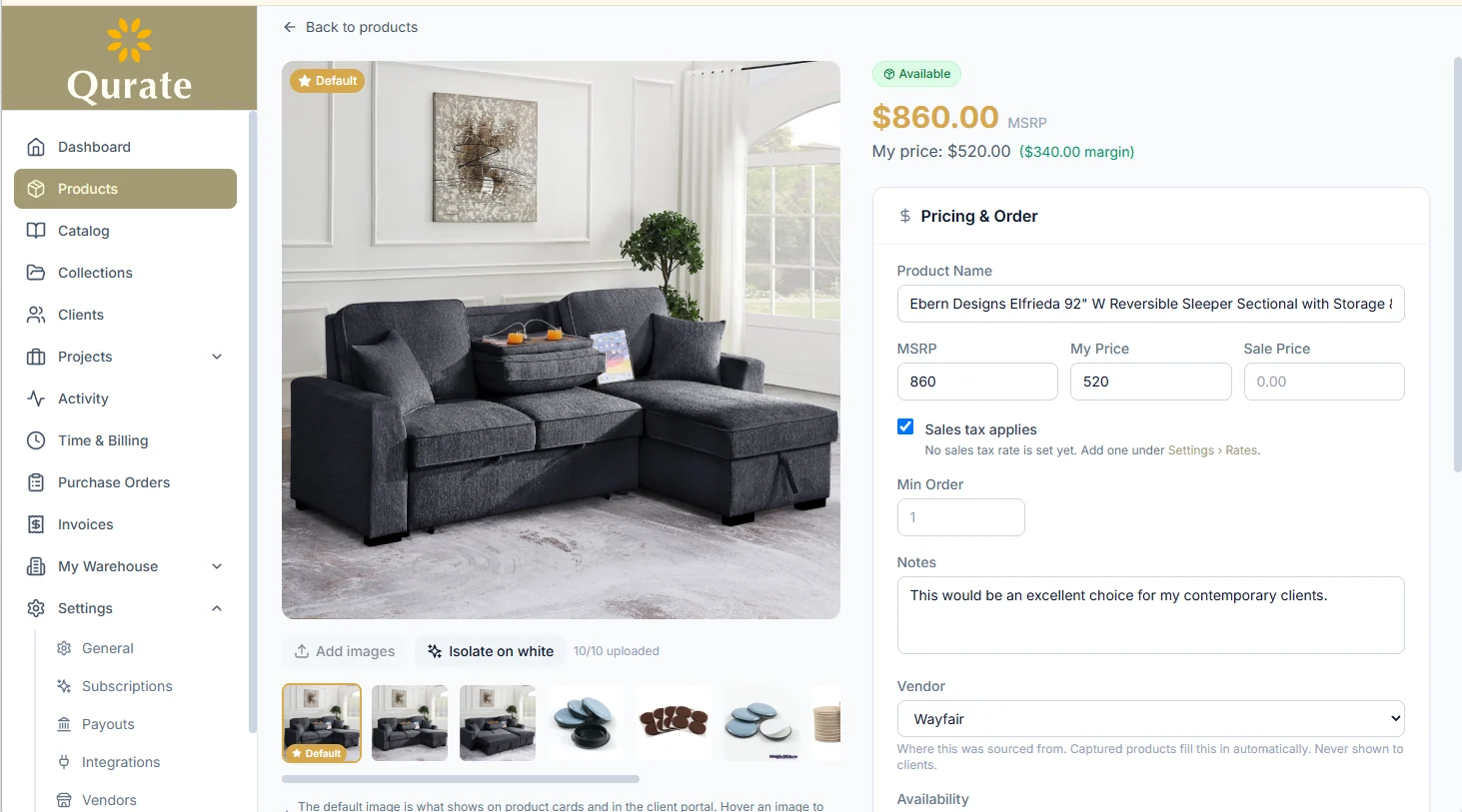
Found the perfect sofa on Wayfair? A stunning light fixture on West Elm? A statement piece from a specialty retailer?
Save products directly into your Qurate library using the Chrome extension. Keep product images, descriptions, pricing, and source information organized when available.
No more scattered bookmarks, screenshots, or forgotten product links.
Start Your 14-Day Free TrialWhat one click saves
- The product’s name, price and photos, read from the page
- The link back to where you found it, and the vendor it came from
- A place in your library, ready to drop into collections and projects
- Your own price beside the vendor’s, so the margin is yours to see
Works on any product page. Tuned for Wayfair, West Elm, Pottery Barn, CB2, Restoration Hardware and Crate & Barrel. You can also add products by hand or import a spreadsheet.
AI room visualization
Show Clients the Possibilities
Before They Commit.
Help clients fall in love with your vision before a single piece of furniture arrives.
Upload a photo of their room and use Qurate Reimagine to create AI-powered concepts connected to products you've sourced.
Move from inspiration to actionable design decisions without rebuilding your work.
From “I love it” to “Let's make it happen.”
Start Your 14-Day Free TrialReimagine is included on Professional (150 renders a month) and Studio (600).
Before

After

A client's room and the Reimagine concept made from it. A render is an illustration of the idea, not a photograph of the finished room.
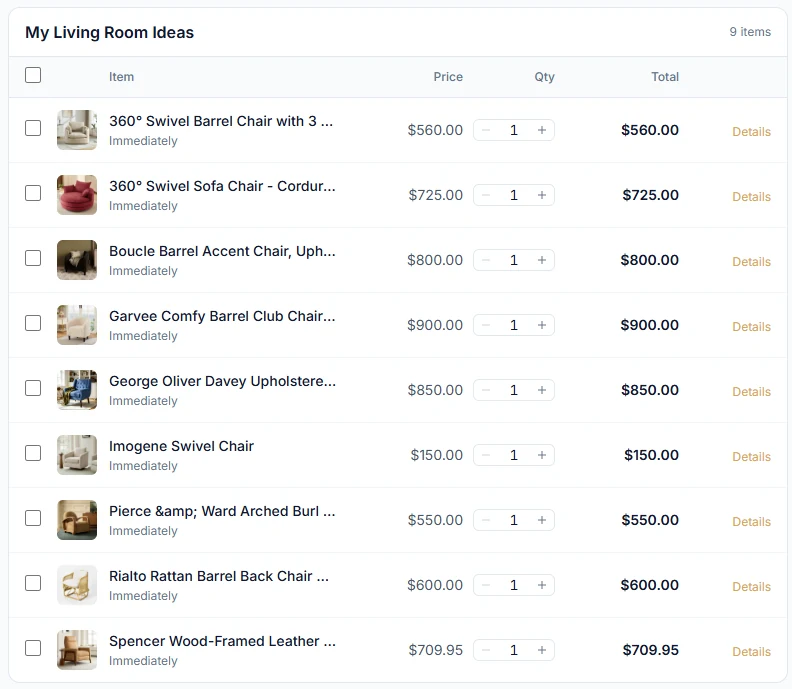
What a client sees in their portal: your selections, at your price.
Client presentations & approvals
Make Every Client Presentation
Feel Effortless.
Give clients a professional space to review your selections, approve products, and request changes.
No confusing email chains. No lost feedback. No wondering which products were approved.
Keep decisions organized and projects moving forward.
A smoother experience for your clients. A more organized business for you.
Start Your 14-Day Free TrialMargin protection
Your Expertise Has Value.
Protect It.
You spend years building vendor relationships, discovering unique products, and developing your professional eye.
Qurate helps protect that investment.
Keep vendor costs separate from client pricing, control which sourcing details are shared, and present selections under your own brand.
Your clients see your vision. You stay in control of your margins.
Start Your 14-Day Free Trial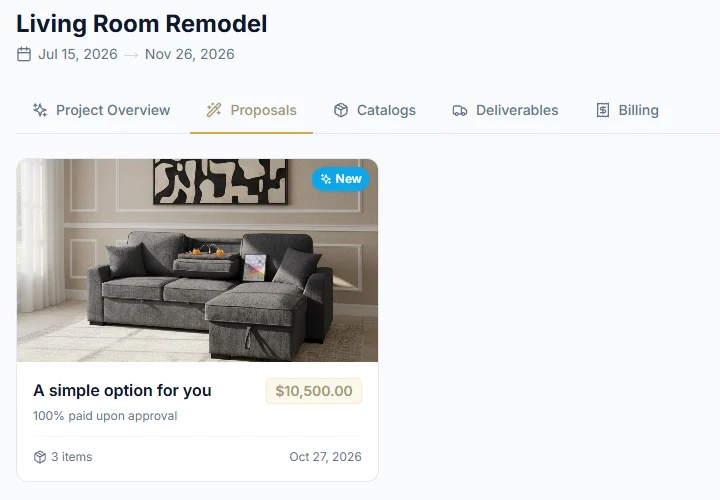
What the client sees. Vendor and cost never leave your library.
Billing & payments
Get Back to Designing.
Not Chasing Payments.
When clients approve products, Qurate can turn those selections into draft invoices.
Add billable time, send invoices, and let clients pay securely through their portal.
Less repetitive data entry. Fewer disconnected systems. A simpler path from approval to payment.
Start Your 14-Day Free Trial- Draft invoices fill in from approved products and unbilled hours
- Clients pay by card in their portal
- Payouts go to your bank through Stripe once you connect an account
Qurate keeps a platform fee on client payments: 2% on Starter, 1% on Professional, none on Studio. Stripe's card processing fees apply separately.
Receiving & installation
From the First Order
to the Final Reveal.
A beautiful design means little if the furniture arrives damaged, the wrong piece gets delivered, or nobody knows where an order is.
Qurate helps you follow products from purchasing through receiving, storage, and final delivery.
Track arrivals, record damage, organize warehouse information, and keep installation details connected to the project.
Because a successful design isn't just about how it looks. It's about how smoothly it comes together.
Three ways to receive
- Find a receiver
- Search the Receiver Registry for receiving warehouses, storage and white-glove delivery near the project, and save the ones you use.
- Stay connected to them
- A receiver using Qurate Connector or the Receiver API reports arrivals, condition, photos and deliveries onto your project as they happen.
- Or receive it yourself
- Run a garage or storage unit like a warehouse: locations by building, room and shelf, QR labels, and inventory until delivery.
Through the Receiver API today: shipment and delivery updates. Shipping quote requests are answered in Qurate Connector. Run a receiving warehouse? List it free.
Everything Else
Your Projects Need.
Shoppable product catalogs
Group products from your library into a catalog at your price. Clients pick what they want, choose quantities, and pay by card in their portal.
Room planning
Draw the room to scale, then place the products you’ve sourced with their real footprints, so you know it fits before it’s ordered.
Warehouse Receiver Registry
Find receiving warehouses, storage and white-glove delivery near a project, and keep the ones you trust as Preferred Receivers.
For receiving warehousesE-signatures through Signadoc
Every account includes a free Signadoc account on the same login, for contracts your clients sign online. The free plan covers 3 signing requests a month and 5 document templates.
See SignadocProduct and order tracking
Purchase orders, expected arrivals, deliveries and installs sit on the project and on one calendar, so every piece has a status.
Team collaboration
Bring your team into the same projects. The Studio plan includes up to 5 team members for one flat price.
Professional Design Tools.
Without Enterprise Pricing.
Whether you're an independent designer or growing a studio, Qurate gives you room to grow without paying for every additional login.
Start with the tools you need today and upgrade as your business expands.
Starter
Everything you need to get started
- Up to 50 products
- 3 collections
- 1 client
- Chrome extension
- Client portal access
- Invoicing & client card payments
- Free Signadoc e-signature account
- 2% fee on client payments
- Basic support
Professional
For growing teams & practices
- Unlimited products & collections
- Up to 5 clients
- Reimagine AI renders
- Invoicing & client card payments
- Bank payouts — get paid directly
- Receiving, inventory & QR labels
- Free Signadoc e-signature account
- No per-project fees
- 1% fee on client payments
- Priority support
Studio
For design studios & teams
- Everything in Professional
- Up to 5 team members
- Team collaboration
- No fee on client payments
- Dedicated support
Compare plans
| Starter$19/mo | Professional$39/mo, most popular | Studio$69/mo | |
|---|---|---|---|
| Products | Up to 50 | Unlimited | Unlimited |
| Collections | 3 | Unlimited | Unlimited |
| Clients | 1 | Up to 5 | Unlimited |
| Team members | Up to 5 | ||
| Chrome extension capture | |||
| Client portal & approvals | |||
| Room Planner | |||
| E-signatures with a free Signadoc account | |||
| Reimagine AI renders | 150 a month | 600 a month | |
| Invoicing & client card payments | |||
| Bank payouts via Stripe | |||
| Purchase orders, receiving & QR labels | |||
| Inventory & warehouse locations | |||
| Activity feed | |||
| Platform fee on client payments | 2% | 1% | None |
| Support | Basic | Priority | Dedicated |
Every plan starts with a 14-day free trial. You add a card to start it, and the card is not charged until the trial ends; cancel before then and you pay nothing. Cancel anytime after that. Annual billing saves 10%. Stripe's card processing fees apply separately on all plans.
Frequently asked questions
What is Qurate Designs?
Qurate is product sourcing and project management software for interior designers. You capture products from any website, show clients their room with AI concepts built from those products, get approvals in a branded client portal, invoice and take card payments, and track every piece through purchase orders, receiving and your warehouse to installation.
Who is Qurate designed for?
Independent interior designers, decorators and design studios. Home stagers and event decorators use it too, since any product can be for sale, for rent or both. Receiving warehouses have their own free tools at quratedesigns.com/receivers.
Can I source products from any website?
Yes. Install the Qurate Chrome extension and click it on any product page to save the product to your library with its name, price and images, when the page provides them. Capture is tuned for retailers such as Wayfair, West Elm, Pottery Barn, CB2, Restoration Hardware and Crate & Barrel. You can also add products by hand or import a spreadsheet.
Can clients approve products online?
Yes. Each client gets a private portal that carries your brand, where they review your selections and approve them or request changes item by item. Every decision is recorded on the project, so there is no email thread to reconcile.
Can I keep my vendor pricing private?
Yes. The vendor a product came from is never shown in the client portal or on invoices. You keep the vendor's price and your own price separately, and you choose, client by client, whether prices or source links are visible at all.
Does Qurate support invoicing and payments?
Yes, on every plan. Draft invoices fill in from approved products and billable time. Clients pay by card in their portal, and once you've connected a bank account the money is paid out to you through Stripe. Qurate keeps a small platform fee on client payments: 2% on Starter, 1% on Professional and none on Studio. Stripe's card processing fees apply separately.
Can I work with my existing receiving warehouse?
Yes. Your receiver can list itself free in the Receiver Registry and keep your projects up to date from Qurate Connector, a web portal with nothing to install, or through the Receiver API if it runs its own warehouse system. Send them quratedesigns.com/receivers. If they would rather not, you can still log arrivals, condition and deliveries yourself.
Do I need technical experience to use Qurate?
No. Setup takes under 10 minutes: install the Chrome extension, capture your first products, and send a client a portal link. There is no onboarding call and nothing to configure first; you add clients, projects and invoices as the job needs them.
How does the free trial work?
Every plan starts with a 14-day free trial. After you create your account and verify your email, you choose a plan and add a card. The card isn't charged until the trial ends; cancel before then and you pay nothing. Each account gets one trial.
Can I cancel my subscription?
Yes, anytime, under Settings > Subscriptions. Cancel during the trial and you are never charged. Cancel after it and you keep access until the end of the billing period you have paid for.
How much does Qurate cost?
Starter is $19 a month, Professional $39 and Studio $69. Annual billing saves 10%. Plans are priced per studio, not per seat.
How do Reimagine AI renders work?
Upload a photo of the real space, choose products you've already sourced, and Reimagine renders the room with them. Because every item is a real product with a price, the concept comes with an estimated total, and an approved concept can go straight onto the invoice and into purchase orders. Reimagine is included in Professional (150 renders a month) and Studio (600).
Can my clients buy products directly from me?
Yes. Group products from your library into a catalog, set the price each client pays, and send it to a client or attach it to a project. In their portal the client selects one or more items, chooses a quantity for each, and pays with a saved card. Qurate creates one invoice for the order, charges it, and records your cost beside your price on every line, so you see the margin on each sale. The vendor and what you paid never appear in the portal or on the invoice.
Does Qurate include e-signatures?
Yes. Every Qurate account, on every plan, comes with a free Signadoc account for the contracts and agreements your clients sign electronically. It is created when you verify your email, with the same email and password as your Qurate login, so there is nothing to set up and no second password. In Qurate you upload a PDF, place signature, initials, date and text fields, and send it from the client's Documents tab. The client reviews and signs online, and you both keep the signed copy. The included account is on Signadoc's Free plan, which covers 3 signing requests a month and 5 document templates; a studio that sends more can upgrade inside Signadoc.
Can Qurate help me find a warehouse receiver near a project?
Yes. The Receiver Registry inside Qurate lists warehouse receivers, self-storage and logistics companies across the United States. Search by city or ZIP or from your current location, filter by service, and save the ones you work with. Listings marked Verified have been confirmed by the business and by Qurate. The registry is included on every plan, and receiving warehouses can list themselves free at quratedesigns.com/receivers/register.
Does my receiver update Qurate when items arrive?
It can. A receiver signed in to Qurate Connector marks each piece received, with its condition, quantity and photos, and marks it delivered. A receiver with its own warehouse software can send the same updates through the Receiver API with a key you create under Settings > Developers. Either way the update appears on the item the moment it is sent, and your prices, vendors and source links are never exposed.
Can I store items in my own garage or basement instead of using a receiver?
Yes. Qurate treats any space you control as a warehouse. Define locations by building, room and shelf, such as "Garage, back wall, rack 2", receive each shipment with a condition check and its dimensions, print a QR label, and shelve it. Inventory shows what has arrived and where it sits until you mark it delivered. You can mix both: a receiver for the big freight and your own space for the accessories.
Can I bring in my existing product list?
Yes. Import your current product list from a spreadsheet (CSV or Excel) with names, prices and vendors (Excel files bring their photos along too), and it lands in your library the same as a captured product. You can keep capturing new products with the extension alongside it.
Can Qurate track inventory and rentals?
Yes. Any product can be for sale, for rent or both. You can log shipments as they arrive, print QR labels for thermal label printers, shelve items by building, room and shelf, and see which projects a rental piece is currently out on.
You Bring the Vision.
Qurate Handles the Details.
Your next project deserves more than spreadsheets, scattered product links, and endless follow-up emails.
Bring sourcing, client presentations, approvals, payments, and product tracking together in one workspace designed around the way you work.
Make room for more creativity — and a more organized business.